Hey readers, It has been so long since we had a chat [Even one way :-)]. Have been busy with lot of things. But as I have been saying in past, The more busy I’m, the more I got for you to read. So, le’s come to the point.
It has been roughly a decade since I am privileged to be in Software Development field. During that period, have played different roles. Now, When I look back, I try to analyze lot of things and I came up with my understanding about type of developers. You might ask why I need to know type of developers. Here are my views why:
Hiring : When you are hiring new developers, you need to understand which type of developer is this and which type of developer you are looking for or your team needs right now [I have been part of roughly >50 interviews till this time, and hiring is also one of the data source for this blog post]
Coaching and mentoring : If you know various types of developers and based on that if you identify someone is of some type and he/she should work on X/Y/Z to be of some else type etc.
Forming team: When you start a new project, and you are one of the team selector, Then it will be good to know and make a balanced team.
Self improvement: After reading this post, and If you agree what I am going to say then this post might help you to identify your type and work towards improving other aspects and be THAT BEST DEVELOPER Which World is searching for!
Enough reasons to convince you to read this further? 🙂
I thought a bit and then came a Eureka moment — Where an idea came, Why don’t we use Venn diagram to explain this! And I’m excited to share output with you:
Let me explain these types in detail:
Mainly they are based on their thinking style
Technical : They are super technical. They know each technology as soon as they are available. They would like to get their hands on it and would love to implement it in their current/future project. There are quite a few who will try to fit new technology without even fully understanding it. But they will have solution for all technical problems. And each project must have at least one of them. They make good Technical Architect or Technical role.
Business : This type of devs will understand business very well. They speak client’s language and that’s why most of the time client loves to work with them.
Analytical : This person thinks all things from analytical point of view. (s)he will come up with the easiest and best solution which neither technical/analytical person can think of. They will not be super strong in technical. But If you pair this dev with Technical team member they rock
Technical-Business-Analytical: And you know that sweet spot, when one person can think from all angles. YES, they do exist. But sadly they are very few and again this type of thinking takes sometime. Because when you are out of college, initially you think to solve everything using technology. Because that’s what you have been taught. But gradually, If you mentor someone closely they can come in this type in a longer run. Usually, This type of folks should be leading a team.
So, what makes a best team? It depends on lot of factors, e.g. Project complexity, Resource availability etc. But If you want to make super complex project successful. I would recommend, Combination of these types will rock your project. And that’s what I look for when I have to form a team — Sharing my secret with a wish that you will share with others!
Happy Team Building! 🙂
After getting positive feedback on : https://kiranpatils.wordpress.com/2011/09/29/why-we-need-windows-communication-foundation/ https://sitecorebasics.wordpress.com/2015/04/04/sitecore-multisite-basics/
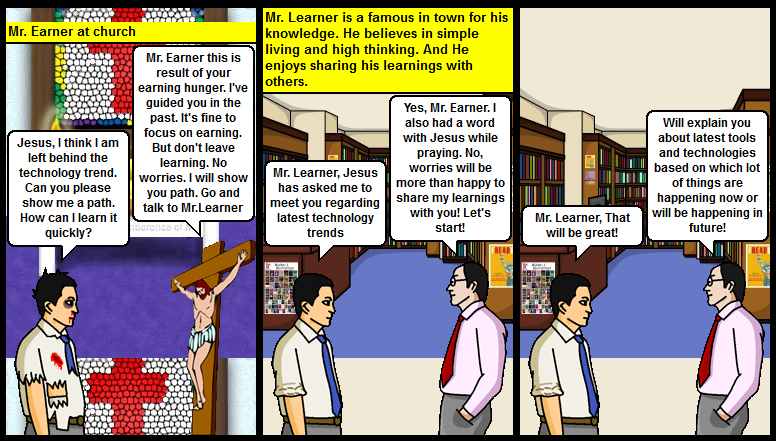
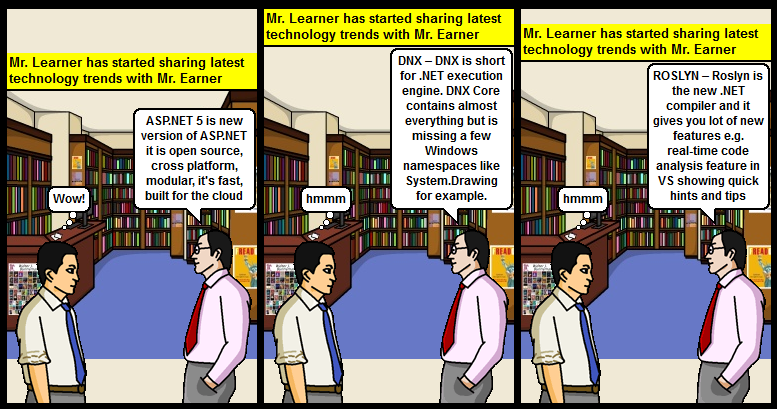
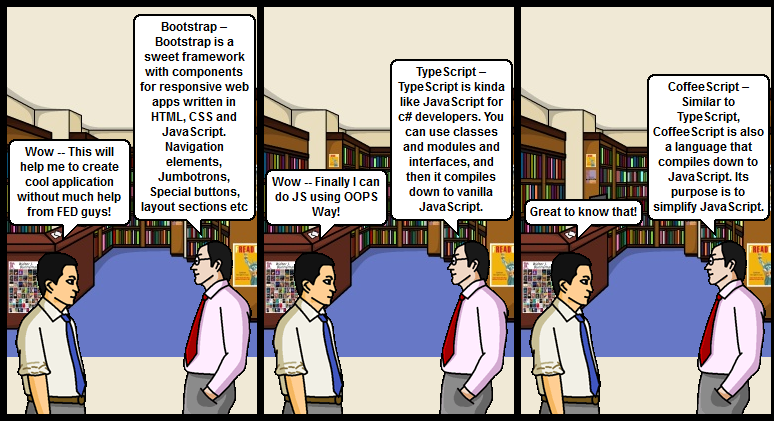
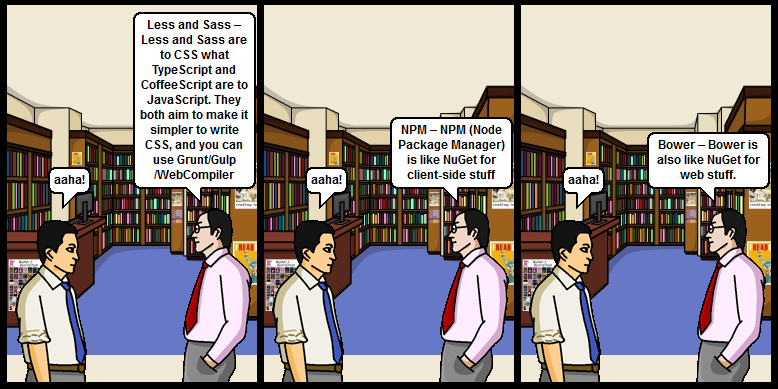
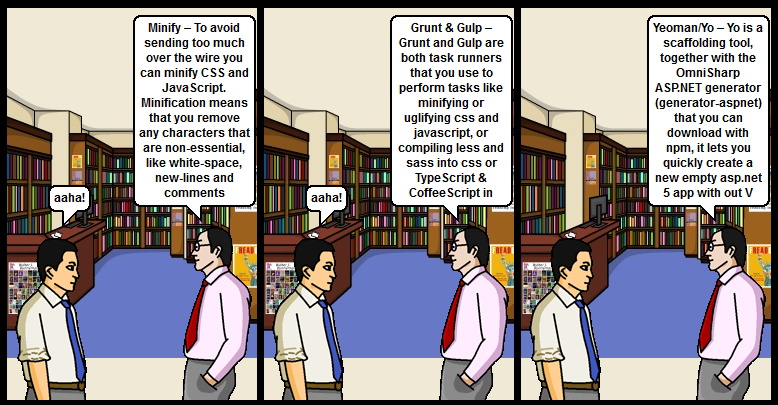
Thought to spend sometime to write a new comic on Technology trend! So, If you would like to learn about Latest technology trend then this article is for you
Before you go further I would like to mention that this article would have not been possible without this article from Tess : https://blogs.msdn.microsoft.com/tess/2015/11/12/mastering-asp-net-5-without-growing-a-beard/
So. If you liked this article then the credit goes to her and NOT me. Because I just converted those learnings in comic — So, you enjoy reading it!
Let’s go!
In a small town there used to be a guy. Who was very had working. His name was Mr.Earner he was very busy in his project and personal life (like you!) and when one fine evening he was reading about latest technology trend. He felt that he left behind the technology trend. So, he went to church and prayed to Jesus for showing him path!
As always Jesus listens him and guides him to talk to Mr. Learner — Mr. Learner is a famous in town for his knowledge and knowledge sharing skills.
Keep learning, Keep Sharing!
Happy Coding! 🙂
As Cricket world cup has completed and Australian team won it again (Congratulations to them!), and apart from few people in India. Cricket is religion for most of us. You too – Correct?
“Winning is habit. Unfortunately, so is losing.” – Vince Lombardi
I know we lost in Semis against Australia – But as Dhoni rightly said “it’s a sport and only one team can win”. And let’s be honest guys and girls too – When Indian team went for World cup all of us, expected that these team won’t reach so far. And here’s when human expectations comes in to the picture, When we started winning, Our expectation raised. And we wanted team to win world cup. But my personal view is that day Australia played good cricket. And we failed to do so. But I’m sure team will take a learning lesson from this and they do better next time! Sorry for taking conversation off track. But it shows, I’m same like you! When it comes to Cricket – We become experts. I personally believe everyone should follow/play at least one sport. It teaches you lot of lessons, which helps you in real life as well! Best lesson is “Match is never end till last ball” – Follow this rule in real life. At last moment (Yes, last moment) there is a chance that things becomes favorable to you. You just need to stay on the pitch! So, whatever the tough situation you are going through. Just be there on pitch! You might be thinking – Why there are few teams, who always keeps winning? And the other one always keeps losing? (In Cricket and in real life too). And I was thinking to apply this logic, in software industry as well. Why few teams always deliver software project successfully and smoothly. And other ones struggle to do so. As per my view there are two types of teams: Type1 : You can identify them using following characteristics:
People love to be at office
Whatever project they work – It gets successfully delivered
No weekend work (If Project needs them, they will be happy to be available)
Everyone goes at home happily and enjoys his/her personal life
Passionate
Enjoying each others in win
They are always happy and cheerful
Not Stressed
Typ2 : You can identify them using following characteristics:
People look forward for way to not be at office
Whatever project they work – It never gets successfully delivered
Always in office during weekend (Few people like to be in the office during weekend for some research or something. But I don’t count them here. They belong to first team. I would consider people who don’t like to be in the office during weekend. But have to be, as SOMEONE has ASKED them to do so)
Not so passionate – Doing something for just sake of doing
No team bonding
Always frustrated
Always stressed
Sounds similar? If you belong to Type1, then you are the luckiest person in this world. But if you don’t know how it works? And would like to understand few reasons behind it. Then this blog post is for you. If you are in Type2, then I’ve an empathy for you. And would suggest that you work out on following points. They will surely help. And if you don’t have that level of control or someone is stopping you from doing so. Would suggest – Get off the bus! http://www.motivation.careers360.com/Hope-and-Motivation/If-you-are-not-enjoying-the-ride-Then-get-off-the-Bus So, let’s see what special Type1 team does to be there:
Disclaimer : This is based on my learnings. I am not expert on this subject. But few basics which I learnt through my journey and have noted it down. Which I am sharing with you. So, if you think something might not work for you. Feel free to ignore it
Leader: I believe team and team’s leaders makes most difference. Because if leader is not secure. Then he/she won’t let team grow. And then the culture becomes worst and worst. But if leader is confident, technically sound, and smart and get things done person. Then team also follows him/her. So, while making someone a leader, please think twice. “People don’t leave company they leave bad leader/manager” And if you are a leader, then I request you to give your best. Because I believe – The responsibility what our Teachers had at School/College level, Parents had at child level, the same level of responsibility leaders have at professional level. “Good leaders create leaders, and others create followers” https://www.ted.com/talks/simon_sinek_why_good_leaders_make_you_feel_safe
People : If Leader is important, Then People working in the team are also equally important. Because people get things done and NOT Process. It makes me amazed that lot of companies focus on setting up good process. But I believe have good people, the process will be automatically good. Their Hiring Process is very strict. They can identify the talent, and know how to groom them! “Only good leader’s eyes can spot, good candidates/leaders”. While Hiring they keep person’s attitude first and technical skills second. Because it’s easy to impart Technical skills than attitude!
Culture : Company’s culture also makes difference. Always hire smart people, and let them do what they think is right. Company should just act as a facilitator. See Google’s work culture!
Timesheets : I agree that time-sheets are good way to track and manage your time. Because based on that we bill to clients. But at times, people just work to fill in their 40 hours. And in this process they lose their creativity and helping nature.
Team bonding : They not only enjoy and spend time with each other in office. But out of office as well. They do spend lot of time together! Type2 teams works more as individuals
Communication and Transparency : Communications are very clear in these type of teams. Things are Green/Red. Anyone can speak out. All things are 100% Transparent. Feedback system is also good!
Training : They have very good training process. So, when someone joins the team. He/she knows what/how these team works. Before he/she gets bombarded with so-called strict deadlines. And lack of training makes it stricter!
Balanced between experience and fresher : They have good balance between fresher and experience. Because both combination is required. But as good cook knows, the best ingredient to make good food. Same logic applies here as well. Experience people brings the lot of knowledge and best practices in to the team, at the same time. Freshers brings the lot of new perspective in the team. And while working together, they share those things with each others. And at the end of the day – Everyone wins!
Clear expectations : As I mentioned in #1, Leader is very important. Because Good leaders are always good in communicating expectations clearly. I believe most of the time Type2 are frustrated because of this reason. Leader and Team members are never in sync with their expectations. I think, as a leader if you let people know what is right and what is wrong. And what you expect from them. Then they make sure they do it!
Learning from mistakes : As Type2 teams are always busy. They just keep running because they are busy. But they never take a step back, and think what is keeping them busy? What mistakes they are doing? How they can learn from them? And Type1 team always learn from their mistakes and shares it with others. So, they don’t repeat it. And that’s how they get things done faster.
Ready to help : They are always ready to help each others, and ready to go out-of-the-way for team
Competition: They don’t compete with each other, they complement each other. If they have competition. That will be healthy completion. Who commits more backlogs/tickets in this release? 🙂 And Competition stuff happens with most of us. Because since school level. We’ve been asked to be first. In Public Transportation (Bus/Train) as well, we always try to be first! But those concepts doesn’t fit while working in a Team
Helps others in down time : The time is not going to be same for anyone. Sometime X is doing well, at that time, Y is struggling. And when Y is doing well. X is struggling. In all situations they help each other during someone Else’s down time
Links : You may find few more points from my earlier leadership posts:
Remember TEAM == Together each achieves more! Sounds good? Have I missed something? Would be happy to incorporate your views.
It is better to lead from behind and to put others in front, especially when you celebrate victory when nice things occur. You take the front line when there is danger. Then people will appreciate your leadership – Nelson Mandela
Luckily, Along with my troop got a chance to be present at Future Unleashed India 2015. Would like to share my experience with them who can’t make it happen or who would like to have a quick recap of it!
It was held at Nesco convention center at Mumbai on 5th and 6th November 2015. On 5th there was a business track (Where Mr. Nadella and lot of big names of Indian IT Industry attended and presented) and on 6th there was a technical track.
Full agenda can is here : http://futureunleashed.microsoft.com/default.aspx
I’ve been able to be part of Technical Day and keen to share that experience with all of you!
But before that will share my registration experience. It was just awesome, Microsoft team kept calling and we were in sync with all latest and greatest details. And on the event day as well. Whole process was super simplified — And would like to say thanks for all the teams for being so helpful and co-operative!
My notes from Technical tracks which I’ve been able to attend:
Keynote by Scott G.
Before keynote started the musical performance was awesome, and it recharged the whole environment!
It was great to see Scott in person. He shared few important updates:
Now, Azure is in 24 Regions around the world!
Azure is unique platform which support On premise setup as well as Cloud setup
Azure it opening 2/3 Data Centers in India
Quick demo of creating new VM and publishing stuff from Visual studio
Quick demo or Power BI as well
He also called few partners to share their learnings with audience. It was great to hear their experience!
Building Modern Web App with ASP.NET 5 and VS 2015
Great session by Mr. Chetan Vaja
He demonstrated capabilities of ASP.NET 5
Few big changes
You can host your ASP.NET Website without IIS — On Console — Self hosted
Can be hosted on Linux and Mac as well — He demoed it!
Has Built in DI
Everything is modular
For web forms you have to use 4.6
It uses Roslyn compiler. Which means you no need to build your change and wait for a long time. Just do a change and do F5 on browser — More like PHP Experience
Awesome session by Mr. Atin Bansal – Senior Program Manager
Demo of IntelliTest : Using which you Visual studio can create all possible test cases automatically. And you can save them as .CS file – As of now it works with Public methods only
Cool things with VSO – Visual Studio Online
Load testing on VSO and VS 2015 : Covers all scenarios I know. But you need to have VS Enterprise license and ready to pay for VSO load testing
Manual testing — Test cases addition and execution support
IOT From Scratch
There will be 25 B connected Gadgets by 2020 [Source : Gartner]
Grove PI +
Full demo : Where PI sent data, Azure was receiving data, and using Power BI we can analyze that data!
Technical Debt with TFS and SonarQube
Good session by Harysh Menon
MS is working on integrating it with SonarQube
So, you can see Technical Debt and can do quality releases!
As of now have to install it using Zip. But they are working on making installer
Neo4j – The graph DB
Good session by BrijRaj Singh
Nicely explained
Graph DB Concept
We had few demos
Overall the event was awesome! Microsoft took very good care of us. Everything was just perfect. Would like to give my gratitude to the whole team — And I thought doing it via blog post will be the best way to do it!
Waiting for the next one..!
If you are using Visual Studio one click publish, and you are facing following error (We were getting it while doing publish from Build server to Target server.) Web deployment task failed. (Could not complete the request to remote agent URL ‘https://<HOSTNAME/IP>:8172/msdeploy.axd?site=<OURWEBSITE>’.) This error indicates that you cannot connect to the server. Make sure the service URL is correct, firewall and network settings on this computer and on the server computer are configured properly, and the appropriate services have been started on the server. Error details: Could not complete the request to remote agent URL ‘https://<HOSTNAME/IP>:8172/msdeploy.axd?site=<OURWEBSITE>’. The underlying connection was closed: An unexpected error occurred on a send.Unable to read data from the transport connection: An existing connection was forcibly closed by the remote host. An existing connection was forcibly closed by the remote host 0 0 WEBSITENAME
Or any other error related to Web Deploy [a.k.a. MsDeploy] technology used behind the scenes of Visual studio publish. Then this post is for you!
Solution:
This is the error, Which took days and days for us. Because all settings were working since couple of years and suddenly it stopped working. Without getting any clue. This is what we did for troubleshooting:
Disable Firewall/Antivirus, Allow Port 8172
Make sure Hostname/IP gets resolved
Server’s IP and Port number is reachable : Yes – We verified it using Telnet and it can connect to Port 8172 and also verified Firewall rules as well – All good!
Verified all Web deploy related services are fine or not – and they are fine – We tried to run Powershell script given by Microsoft in Reference Link #2 – But no luck
Verified username and password are fine – They are fine – Verified it using remote desktop with those credentials
Reinstalled MSDeploy on SBX – and It didn’t helped
No any log entry in MS Deploy IIS Log [HEAD/POST]
Tried with MSDeploy command : msdeploy.exe -verb:dump -source:iisapp=”Default Web Site”,computername=https://:8172/msdeploy.axd?site=Default%20Web%20Site,username=,password=,authType=basic -verbose –whatif
Fired MS deploy command from my local – as given in earlier email and monitored packets on SBX server using TCPView and netstat command : Found that : TCP Packet gets sent on 8172 and status : SYNC_RCVD – and then it drops packet
During this whole process. This is what we understood:
– Web Management Service listens on 8172
– If request received it calls MsDeploy.axd
Somehow, packet gets reached to Machine – But after that it should forward it to IIS – And in turn IIS will send it to MsDeploy – And looking at log files – Packet is being dropped at machine level
Howdy Friends – Sorry for being away since so long. But have been super busy with lot of things. And still lot of things going on. Unfortunately unable to find time to write a blog and share knowledge (I know you don’t find time. You have to allocate it. And yes — Somehow not able to allocate it.) But I’m sure soon will be able to share my learnings with you! And today’s blog would like to dedicate it to Sir Abdul Kalam. He has always been an inspiration for most of us! (Including me and you!). And when I read his following quote – I thought will work extra and get this blog out – Just for you Sir!
What is Raspberry Pi? And what’s the usage of it?
If you haven’t heard about this then you need to come out of your cave. Because lot of techies are talking about this. Especially during March is for Makers movement. No worries — Will help you to understand it.
For Basics — Let’s talk to our friend wiki “The Raspberry Pi is a series of credit card–sized single-board computers developed in the UK by the Raspberry Pi Foundation with the intention of promoting the teaching of basic computer science in schools.”
So, It’s a tiny computer for fun if you are techie and If you would like to inspire kids for learning programming, getting acquainted with computers and start thinking about using Technology to solve real world problems. This is a perfect start! I would strongly recommend you following links:
Also, I see this device got lot of capabilities for Schools and Kids. Because every Kid will have TV at their home. And using Pi they can convert to computer in around 3-5 K (Pi, Wireless Keyboard, Dongle etc.) and they have a machine ready. On which:
They can do programming!
They can access FULL Internet! (Obviously will need Internet Connection) – Access educational material, explore the world!
They can play games
And you never know — Their might be future Bill Gates/Steve Jobs who might be think of great idea — Which might change the future!
I know I am very optimistic. But possibilities are immense! And If someone gets interest in Computers/anything at this age — Then they will surely do miracles!
It looks like, I’ve portrayed Pi as a Kids computer. But wait a minute. If you are not Kid then also this is super useful to solve some real world problems. Few examples:
The kit also includes a 2.5A / 5V USB power supply specially designed and tested for the power-hungry Raspberry Pi 2. The included 2.5A adapter comes with a 5-foot cable and can power the Pi2 and other USB accessories (such as most portable hard drives) without requiring an external powered USB hub.
Kit Includes:
1 x Raspberry Pi2 Model B 1GB
1 x 8 GB MicroSD Card – Raspberry Pi Recommended MicroSD Card with the new NOOBS
1 x Raspberry Pi 2 Case
1 x CanaKit 2.5A MicroUSB Power Supply specially designed for the Raspberry Pi 2 (5-foot cable)
1 x Premium Quality HDMI Cable (6-foot)
1 x WiFi Adapter/Dongle (Ralink RT5370 chipset)
1 x Set of Heat Sinks
1 x Breadboard
1 x 40-pin GPIO Ribbon Cable
1 x 40-pin T-Shaped GPIO to Breadboard Interface Board
2 x Push Button Switches
1 x RGB LED
2 x Red LEDs
2 x Green LEDs
2 x Yellow LEDs
2 x Blue LEDs
10 x 180 Ohm Resistors
5 x 10K Ohm Resistors
1 x CanaKit General Guide for Beginners to Electronic Components
So, go ahead and order one — right now! You already have it — Perfect! Then let’s see next section!
I have got it – Now what?
Unpacking : Unpacking is very easy. And you can find a lot of online tutorials for it.
Installation and Configuration : If you’ve ordered complete kit — Then you will have one Micro SD Card with NOOBS [New Out of Box Software] on it. If not then you can follow this instruction to install NOOBS on your card : https://www.raspberrypi.org/help/noobs-setup/ — Just follow the instructions. You will have your Pi up and running! [I was not lucky, my initial journey was bit bumpy. I spent the couple of days starting my Pi. But I think during that journey. I learnt a lot more about it. Please refer “Few Challenges” section for more info] This is also good : http://www.canakit.com/Media/CanaKit-Raspberry-Pi-Quick-Start-Guide-1.0.pdf
As you know in programming world. When you start learning any new language you start with “Hello World”! In Maker’s world it is Starting an LED using your python script — Trust me when you start LED — That feeling is just awesome! To do that, I followed this article : http://www.thirdeyevis.com/pi-page-2.php
Make sure you follow first step and your LED should light up without any program — If it is not lighting up. Which means your connection is not perfect
Pi Connected with Breadboard and LED light up!
Pi GPIO Header Quick Reference
Now, Let’s do it programmatically!
connect your one cable to – GPIO 27 and another one to Any Ground
Make sure you’ve setup your circuit as per schematic mentioned in an article
Make sure you’ve opened Python IDE using terminal as mentioned in an article
Your code should look like this:
[sourcecode language=”python”]
import RPi.GPIO as GPIO ##Import GPIO Library
GPIO.setmode(GPIO.BOARD) ##Use board pin numbering
GPIO.setup(13,GPIO.OUT) ## Setup GPIO on Pin13 to out
GPIO.output(13,True) ##Turn on GPIO pin 13
[/sourcecode]
Run it, and your LED should light up!
After that, I wanted to ON/OFF this LED using my mobile! — And we did that using Flask – Flask is a microframework for Python based on Werkzeug, Jinja 2 and good intentions. Basically it is a web server — Which is easy to set up and run! – Trust me — Super easy! — Once we started web server — Then it was very easy to get it done. And then connected my mobile in same WIFI — And accessed URL. Using which I can start LED ON/OFF from my phone! Few things to keep in mind:
When I was configuring Pi with my old monitor [VGA to HDMI Converter], PS2 Mouse and Keyboard [PS2 to USB Converter]. I was getting following error: Kernel panic – not syncing: VFS: Unable to mount root fs on unknown-block(179,2)
Referred all above blogs. But nothing worked. But after changing it to new monitor with HDMI Cable and new Wireless USB Keyboard and Mouse — It started working! So, I am sure it was hardware failure!
I hope this article helped you to understand Basics of Pi and inspired you to get your hands on it! This is just begining — Lot of things can be done using this. And it will be done in upcoming days — Just need to find sometime!
Special Thanks to Daniel – For helping me understand all the basics!
Hey Readers — You will be happy to know that, Your this blog author has completed 8 years working in an industry! Yeap, this happened on 14th May. It really feels great!
To be honest, Haven’t realized. How these 8 years went! When you take a step back, sit quietly and think on it– Then it seems like all happened in a blink of an eye!
To check whether you are moving in right direction or not, It’s always good to check where you were and where you are! If you are in good position, you are happy then you are moving in to right direction!
8 Years is a big time, it means:
96 Months
417 Weeks
2921 Days
And luckily I found this article so long back, Which I tried to follow : http://programmer.97things.oreilly.com/wiki/index.php/Do_Lots_of_Deliberate_Practice
Now, When I look back, I feel happy and enjoyed and enjoying what I did and do. Because when you start your career. You are enthusiastic, You want to change the world, And then after sometime you get carried away. For an instance, There were lot of good players in Cricket. But few of them had a great career as Sachin, Brian Lara, Sunil Gavaskar etc. Same as in film industry. You take any industry you will find the examples.
So, I was writing quick notes in my diary. What things I learnt in these 8 years. Good/Bad. And then I thought to share it with you. Especially folks who are young and starting their career or going to start their career or in between of their career. Might find it helpful. So, here we go:
Focus on your basics — Somehow I figured this out sooner. That focus on your basics skills. Whether it is in Technical, Communication or Soft. Because to be in this/any industry. You just can’t sustain on a single skill — e.g. If only your technical skills are good. But your communication is not good. Then you will survive. But not grow! At the same time, Based on your communication skills you will survive for a shorter time. But not for a long time
Be Technically Strong : At initial stage, Focus on your technical skills a lot. Because if you are technically not strong. Then it will be tough to sustain in a longer run! — Yes other skills matter for sure. But at initial stage this matters more as per my view! — Because once plant is a tree, you can’t mold it! Always be in sync with latest and greatest. Because technical industry changes over the night. And if you don’t upgrade your self. You will be dinosaur!
Read Read Read, Learn Learn Learn – Read as much as you can. Technical or Non Technical. But you must need to have reading habit! When I see my small library, It feels good. Because those books made me good programmer and good human being as well!
Keep Sharing your knowledge : If you learnt something, share it as soon as you can. Because when you share, you learn it better. Following are few of my ways to share:
Have been visiting faculty — And was lucky to share my craft with great talented students!
Mentor and Train : Have been luck to mentor and train — few young and great minds!
Communication : Because communication is key. If you can talk to compilers, that’s good. But at the end of the day. Your software will be used by Humans! So, you need to understand what they need. And explain them how that works! I worked a lot on this, Because I was pass out from Local Indian language school. Where English was just one subject. I still remember, initially before sending an email and writing blogs. I was double checking my spelling and grammatical mistakes! 🙂 But that’s exercise helped a lot!
Keep your passion alive : What I’ve seen is, gradually people goes in to Comfort zone — The dangers zone in this world! Always be on your toes, Keep pushing your self. Find your big dream about life. And just keep working in that direction! Please remember, So fewer people in this world, get a chance to work on the stuff they love to do!
Work smart : Always keep looking for ways to improve – The biggest room in this world is room for improvement! Work smart, and get things done — Rather than complaining about anything!
Make good relations : Respect people, make good relations. That will help you as you grow in your career for sure! And it’s humanity right! We are humans! “I’ve learned that people will forget what you said, people will forget what you did, but people will never forget how you made them feel.”
Be a good team player : Each company, and each team needs good team players. Be away from office politics, crab mentality. Help people grow, and then only you will grow!
Finally, Great lines from Harsha Bhogle “And I have seen too many outrageously talented, young Indian cricketers who chased the rupee and lost the runs. In essence, one must chase the performance goals and letting the results take care of itself.”
You also completed long time with this industry? I missed to cover your point? Please do share with young folks. They will surely thank you for that!
Thanks for reading, Love what you do!
One fine day, while doing SVN Cleanup. We faced following error:
Cleanup failed to process the following paths:
<PATH>
Previous operation has not finished. If it was interrupted
Please execute the ‘Cleanup’ command.
You are also facing similar challenge? Then you are at the right place.
Solution:
Open command prompt
Type TortoiseProc.exe /command:cleanup /path: /closeonend:0
This something I wrote 6 years back. But never published it. I was checking my old notes, and found this. I thought it’s still true and it will be good idea to share it with you with some updates:
I have time to update my Facebook Status,
But I don’t have time to get updated with my country’s status.
Because I’m busy!
I have time to Google Anything,
But I don’t have time to think, How I spent that evening.
Because I’m busy!
I have time to Tweet,
But I don’t have time to play with a kid, Who is really sweet.
Because I’m busy!
I have time to receive a call and have a long talk,
But I don’t have time to make a call and simply talk.
Because I’m busy!
I have time to chat on WhatsApp for a long,
But I don’t have time to say HI to my Mom.
Because I’m busy!
Are you really busy? Are you still busy? Good to see: https://www.youtube.com/watch?feature=player_embedded&v=Z7dLU6fk9QY
The WordPress.com stats helper monkeys prepared a 2014 annual report for this blog.
Here’s an excerpt:
Madison Square Garden can seat 20,000 people for a concert. This blog was viewed about 69,000 times in 2014. If it were a concert at Madison Square Garden, it would take about 3 sold-out performances for that many people to see it.